Simon Willison / 文章
用两台 iPad、一部手机和两台笔电,他把神秘蜂鸣定位到大约 40 厘米内
Simon Willison 不想翻完一屋子没拆的搬家纸箱,于是让 Claude Code 做了一套多设备声音定位系统。它最后在那一堆箱子里找到一只急着换电池的旧一氧化碳报警器。
乔木改写
家里有一间还堆着搬家纸箱的房间,几周前开始断断续续发出蜂鸣。蜂鸣隔得够远,站在屋里辨认方位很折磨,Simon Willison 也不想把那些箱子逐个翻开。他让 Claude Code 做了一套名叫 Beep Locator 的软件,用散落在房间里的多台设备,给这声神秘蜂鸣定位。
这套系统按他的设想工作了。它把蜂鸣位置定到大约 40 厘米以内,他随后翻开那一堆箱子,找到一只急着换电池的旧一氧化碳报警器。
文章发布于 2026 年 11 月 9 日 23 时 57 分(UTC),他也在 X 上分享了这篇文章,地址是 https://x.com/simonw/status/2119945524514328631 。
几台闲置设备先互相听,再一起听那声蜂鸣
主界面由一台设备上的 Python 网页服务提供。其他设备扫描二维码或打开网址,就能加入成为听音端。他当时用了两台 iPad、一部手机、一台 MacBook Pro 和一台 Surface Ultra。
设备之间会互放声音,用来估计彼此的位置。这个办法效果并不太好,所以他又加了 Rough mode:先把图标拖到房间里大致所在的位置,再用那些互放的声音去做微调。
听音端就位之后,所有设备一起听那声蜂鸣。
他又加了拍手模式,好在房间不同位置拍手来测试系统,拍手会在地图上显示成菱形。这让他更有信心:它确实能定位一种声音。
蜂鸣在地图上显示成 X,并出现在 Sounds located 日志里。每一条都可以回放,而且是按设备依次回放,用来确认这就是要找的那声神秘蜂鸣,然后再点 This is the mystery beep 把它标出来。
确认过这种蜂鸣的频率之后,系统会专门听它,测量两次蜂鸣之间的间隔,再用三角定位把最可能的位置锁定在地图上。
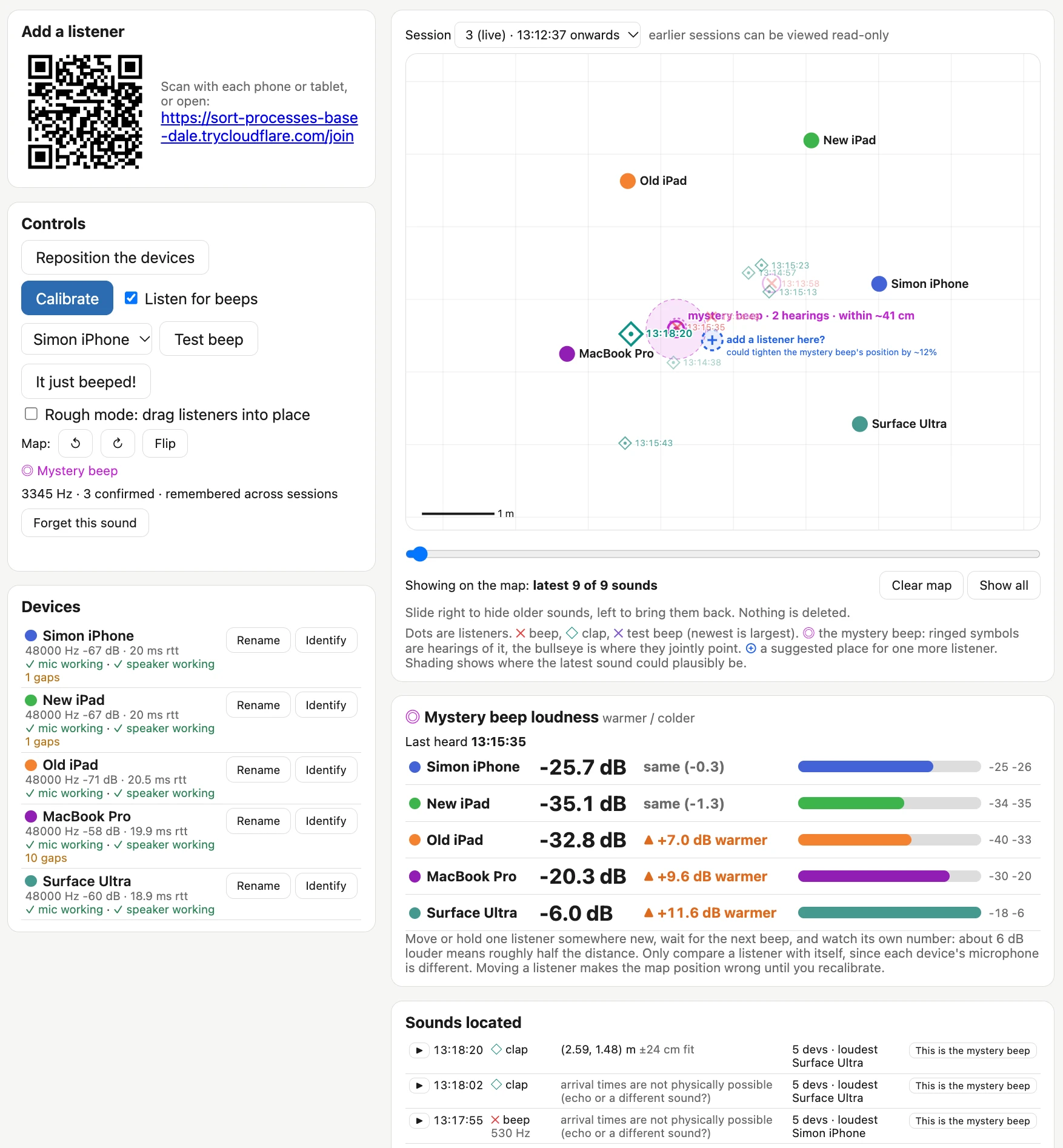
文中这张运行一段时间后的截图里,左侧是加入听音端的二维码和链接、校准与测试按钮,以及五台设备的状态。地图上五台设备被标成不同颜色的点,神秘蜂鸣附近有一圈粉色阴影,标注是 mystery beep · 2 hearings · within ~41 cm,旁边还有一个虚线加号,建议在那里再放一台听音端,并写着 could tighten the mystery beep's position by ~12%。界面也显示这种被记住的神秘蜂鸣是 3345 Hz,已经确认过 3 次。截图下方的响度条里,Surface Ultra 当时最响,显示为 -6.0 dB。
媒体未能载入,请通过下方原文链接查看。
定位靠的是 2007 年的一篇声学测距论文
他一开始和 Claude 讨论这个问题时,Claude 很快找到了 2007 年的论文 BeepBeep: A High-Accuracy Acoustic-Based System for Ranging and Localization Using COTS Devices,作者是 Chunyi Peng、Guobin Shen、Yongguang Zhang、Yanlin Li 和 Kun Tan。论文摘要说,这是一套高准确度的声学测距系统,能在临时、点对点的环境里工作,不依赖预先布置的基础设施;它是纯软件方案,只需要扬声器、麦克风和某种设备间通信,因此适用于许多低成本传感器平台,以及当时大多数现成的手机和个人数字助理。它靠三种技术组合来达到高准确度:双向感知、自我录音,以及按采样计数。
这听起来正是他们需要做的东西。论文 PDF 在 https://www.cs.purdue.edu/homes/chunyi/pubs/sensys106-beepbeep.pdf 。
Beep Locator 的主体是一个 Python 网页应用。听音端通过 WebSocket 连上服务器,界面会请求浏览器的麦克风权限。听音端主要维护一段最近 60 秒的音频缓冲,同时运行一个简单的蜂鸣检测算法,代码在 detector.js 里。它用快速傅里叶变换和高通滤波找出可能的蜂鸣,再把这些事件发给主服务器。
有设备报告蜂鸣之后,服务器会让一台设备播放一小段啁啾声,选的是到服务器往返时延最短的那一台,然后要求每台听音端上传一段录音:大约从蜂鸣前 0.6 秒,到这段啁啾声之后 0.8 秒。这段啁啾声用来把各台设备的录音对齐,是定位里关键的一步。
项目代码在 https://github.com/simonw/beep-locator 。
先在手机上让 Opus 5.5 起稿,Fable 5.2 发布后改在笔记本上继续改
他刚开始做这件事时,用的是手机上的 Claude Code Cloud,模型是 Opus 5.5,并开了 Extra thinking。起始会话是对着一个新建的空 GitHub 仓库,他先让它写出一份 problem.md,把问题说清楚:房间里有设备在响,他找不到;希望在房间四周同时安放几台笔记本、手机和 iPad 来帮忙三角定位;需要一个 Python 网页应用来协调,一台设备显示主界面,其他设备打开网址就变成听音端,全部通过浏览器里的 WebAudio 和连回 Python 服务的 WebSocket 完成;最好不必手工输入设备的相对位置,如果它们能互放声音来在二维空间里定位彼此就好了,不过他当时也不确定这是否可行。
这份共享起始会话在 https://claude.ai/code/cshk_016BvfqAWf7MeGZKeYCrUnN2MmRfCSAX9Gu8DiptXMuH9P 。Claude 写出的 problem.md 在 https://github.com/simonw/beep-locator/blob/main/problem.md 。写问题说明的过程中,Claude 找到并读了那篇 BeepBeep 论文,并写进了这份文件。
研究看起来靠谱之后,他让它动手建造,并要求加上一种机制:可以把新代码发给听音端,让它们自动运行。这样他就能在房间里把设备都安顿好,然后离开,让 Claude 自己继续改和做实验。
这一步把系统的大部分都搭了出来,不过当时还没有真正跑过。
他把新仓库克隆到笔记本上,启动 Claude Code,这时候 Fable 5.2 发布了。他觉得这个项目正好适合拿来试试新模型。Anthropic 的发布说明在 https://www.anthropic.com/claude-fable-and-mythos-5-2 。
他让笔记本上的 Claude Code 把服务器跑起来,并确保它既能看到现场发生了什么,也能在软件运行时做现场修改。
这些能力当时已经写进软件里了:Opus 5.5 给听音端做了一个 installModule() 方法,可以通过 WebSocket 触发,也就是管理端能在任何客户端上执行新的代码。
有些设备上,监听麦克风的网页每次重新加载都会再要一次用户许可。热替换模块意味着他们能在不必逐台重新操作听音设备的情况下部署新代码。
从那以后,他的主要工作变成坐在笔记本旁边,和 Fable 5.2 聊现场情况,偶尔要求加上新功能。文中列出的一部分提示词包括:
他觉得需要能在 Rough mode 里拖动地图上的东西,自己只负责把设备放到大致位置,退出这个模式后再尝试把位置做准。
他想知道怎么测试,于是问能不能让它听拍手,自己拍手后由系统标出拍手位置;拍手在地图上应该和蜂鸣用不同的符号。
每个符号都应该带上时分秒时间戳,这样更容易看出哪个符号对应哪一次真实声音。
日志应列出蜂鸣和拍手及其时间戳,并带一个播放按钮;点下去以后,按听音端顺序回放各台设备录到的声音,屏幕上清楚标明哪一段来自哪台设备,回放时暂时关掉麦克风录音。
每条录音旁边应有 This is the mystery beep 按钮,他可以先回放确认,再把它标成要找的那声蜂鸣;之后系统就能用这个信息去判断后来的声音是不是同一种蜂鸣,并据此形成一个更准确的位置估计。
接近目标时,他已经大致知道蜂鸣从哪一带传来,又希望能把听音端重新摆到那一点周围,得到更细的位置。他不想重启每台听音设备,于是要求加一个 Reposition the devices 按钮:点下去进入重新摆放,再点 Repositioned 后回到 Rough mode,请他把设备大致放到新位置上,完成后再继续听。此前的会话可以在应用里只读回看。
因为手头还有一台多余的设备,他又要求地图上标出一个建议位置,说明在已有数据看来,再放一台听音端会比较有用。
他认为最有意思的部分,是给 Claude Code 接上了耳朵
Claude 目前还没有原生的音频输入,但它可以运行能分析麦克风录音的 JavaScript 和 Python 代码。
他让它运行一个带 WebSocket 的网页服务,连上多台听音设备,再让这些设备用 WebAudio 打开麦克风,并且可以通过这条 WebSocket 接收新的 JavaScript 并执行。
之后他差不多就可以把它留下,让它自己改这个问题、查询音频日志,并重新配置自己的“耳朵”来解决问题。
这让他想起几周前在 GitHub Universe 听到的一个类似做法。Martin Woodward 告诉他,自己在调试 GitHub Badge 电脑时,用 USB-C 把它们插到一台电脑上,再拿网络摄像头对着屏幕,这样他的编程智能体就能看出更新是否真的生效。Martin Woodward 的 GitHub 主页是 https://github.com/martinwoodward 。
他的判断是,想办法让编程智能体感知周围的世界,这件事本身就很好玩。
如果也要让编程智能体处理房间里的声音或屏幕上的变化,可以像他这样先给它接上感知通路,而不是只在文字里描述现象。这是这篇记录里他实际做的事,不是另外添上去的产品建议。完整实现和论文引用,以他的原文和代码仓库为准。
原文
Locating the source of a mysterious beep with Claude
媒体未能载入,请通过下方原文链接查看。
Locating the source of a mysterious beep with Claude
9th November 2026
Our house has a box room, full of boxes that we still haven’t unpacked from our last move. A couple of weeks ago something in that room started intermittently beeping. The beeps were far enough apart that standing in the room and trying to determine the source of the noise was frustrating, and I really didn’t want to dig through every one of those boxes. So I had Claude Code build Beep Locator, a software system for triangulating the source of a mysterious beep using multiple devices scattered around the room.
Here’s what Beep Locator looks like after it has been running for a while:
You run Python web server to show the primary UI, and then use the QR code or URL to connect as many devices as you can spare to act as listeners—I was using two iPads, a phone, a MacBook Pro and a Surface Ultra.
The devices then play noises to each other to help estimate their locations. This didn’t work particularly well, so I added a “Rough mode” where you can drag their icons around in the space to provide rough locations which are then adjusted based on those sounds.
Once that’s set up, the devices all listen for the beep!
I added a clapping mode too so I could test it by clapping my hands in different locations around the room—displayed as diamonds on the map. This helped me gain confidence that it was capable of locating a sound.
Beeps show up on the map as an X, plus a line in the “Sounds located” log. You can replay these sounds (from each device in turn) to confirm they are the mysterious beep you are looking for, then click “This is the mystery beep” to mark them as such.
Once you’ve confirmed the mysterious beep frequency the system will listen out for it, measure the interval between beeps, and use the triangulated locations to lock down the most likely location on the map.
The system worked as intended. It gave me the position of the beep to within about 40cm, then I dug through that specific pile of boxes and found an ancient carbon monoxide detector that desperately wanted its batteries replaced.
How it works
When I started working through this problem with Claude it quickly dug up BeepBeep: A High-Accuracy Acoustic-Based System for Ranging and Localization Using COTS Devices, a 2007 paper by Chunyi Peng, Guobin Shen, Yongguang Zhang, Yanlin Li, and Kun Tan. Here’s that paper’s abstract:
We present the design, implementation, and evaluation of BeepBeep, a high-accuracy acoustic-based ranging system. It operates in a spontaneous, ad-hoc, and device-to-device context without leveraging any pre-planned infrastructure. It is a pure software-based solution and uses only the most basic set of commodity hardware – a speaker, a microphone, and some form of device-to-device communication – so that it is readily applicable to many low-cost sensor platforms and to most commercial-off-the-shelf mobile devices like cell phones and PDAs. It achieves high accuracy through a combination of three techniques: two-way sensing, self-recording, and sample counting.
That sounded exactly like what we needed to build!
Beep Locator runs a Python web application server that does most of the work. The listening devices then connect to that server via WebSockets and present a UI which requests browser microphone access. The listeners mainly work by recording a 60 second buffer of recent audio. They also run a simple beep detection algorithm (see detector.js), which uses Fast Fourier Transform and a high-pass filter to identify potential beeps. It sends these events to the main server.
When a beep is reported, the server has a device play a short chirp (the device with the lowest round-trip time to the server), then asks every listener upload a clip from about 0.6s before the beep to 0.8s after that chirp. This chirp allows the clips to be aligned with each other, a crucial step in locating the beep.
How I built it
I started this project using Claude Code Cloud via my iPhone, with Opus 5.5 running in Extra thinking effort mode. Here’s that shared starter session, which began with this prompt against a newly created empty GitHub repository:
Write out a problem.md file describing the problem we want to solve
There is a device beeping in a room and I cannot find it
I want to set up several devices - laptops, phones, iPads - around the room all listening at the same time and have them help triangulate where the beep comes from
There needs to be a Python web app which coordinates it all - one device shows a web page for the app, other devices join a URL which turns them into listeners - all via browser WebAudio and WebSockets back to the Python server app
Ideally I wouldn't need to manually input the relative locations of the devices - it would be amazing if they could play sounds to each other in order to locate each other in 2D space - is that even possible though?
That got me this problem.md file. As part of writing that up Claude found and read the BeepBeep paper, which is described in that file.
The research looked good, so I told it:
Ok try and build it, add a mechanism so you can send new code to the listeners which they will then run automatically - that way I can set everything up in the room and then leave you alone to continue hacking and experiment while I do something else
That got me to this point—most of the system was built, but nothing had actually tried running it yet.
I cloned the new repository to my laptop and fired up Claude Code... and then Fable 5.2 was released, and this project seemed like an excellent opportunity to put that through its paces.
I had Claude Code on my laptop start the server running, then made sure it could both see what was happening and make live changes to the software as it ran.
This was already baked into the software: Opus 5.5 had built an installModule() method on the listeners that could be triggered over the WebSocket connection, meaning the admin server could execute arbitrary new code on any of its clients.
On some devices, web pages that listen on the microphone request user permission any time the page reloads. The hot-swap module mechanism meant that we could deploy new code without having to manually interact with each of the listening devices in turn.
From that point on my involvement was mainly to sit by the laptop chatting with Fable 5.2 about what was going on, and occasionally requesting new features. Here are some of the feature prompts I ran:
I think we need to make it so I can drag things around on the map in “rough mode”, where my job is just to put them roughly where they are, then switch out of rough mode and it attempts to get them accurate
This gave me the ability to drag listeners around the map.
what’s a good way for me to test this I wonder? Can we have it listen for claps, then I could clap and it could identify the location of the clap? [...]
Claps should use a different symbol on the map than beeps
That added the thing where any time I clapped it would show on the map as a different symbol from the beeps.
each symbol on the map should include a HH:MM:SS timestamp
That made it easier to spot which symbol likely reflected which real-world sound.
The log should show beeps and claps with their timestamps AND have a little play button which, when clicked, replays the recorded noise from each of the listeners in sequence (with clear text on screen showing which listener recorded which snippet) while temporarily turning off microphone recording while that replay plays
Now I could replay sounds, making it much easier to identify which recorded clip was the mysterious beep I was looking for.
There should be a button next to a recording for “This is the mystery beep” - then I can hit replay to see and then confirm it was the mystery beep if that’s the one I am looking for
Then the system can categorize noises in the future to see if they are likely that same mysterious beep and use that information to build a more accurate idea of where it is
At this point I was getting close—I had a solid idea of where the beep was coming from, but wouldn’t it be neat if I could reposition the listeners around that point to get an even finer location?
I want a feature for this, I don’t want to have to restart each listening device etc, I want to be able to click a “Reposition the devices” button which lets me switch into repositioning, then I click “Repositioned” and it puts me into Rough mode and asks me to roughly locate them, then I do that and click, then it starts up again. The previous session can be read-only viewed through the app.
And since I had one spare device, I then said:
add a feature where the map includes a spot that is a suggestion for a location that it would be useful to add a listener at - based on data collected so far
Giving Claude Code ears
I think the most interesting part of this project is that I demonstrated it’s possible to give Claude Code ears.
Claude doesn’t have native audio input (yet), but it can run JavaScript and Python code that can analyze audio captured by a microphone.
I told it to run a web server with WebSocket connections to multiple listening devices, then had it both run a WebAudio microphone on those devices and hook them up so they could be sent fresh JavaScript code to execute via that WebSocket.
Then I could pretty much leave Claude alone, hacking away at the problem, querying the audio logs, and reconfiguring its ears to help it solve the problem.
I’m reminded of a similar hack I heard about at GitHub Universe a few weeks ago, where Martin Woodward told me he had been debugging the GitHub Badge computers by plugging them into a computer via USB-C and then pointing a webcam at their screen, so his coding agent could tell if updates were working correctly or not.
Figuring out ways to let coding agents perceive the world around them is a whole lot of fun.
Posted 9th November 2026 at 11:57 pm
Project: https://github.com/simonw/beep-locator